Friday, October 31, 2025

The Candyinator

Background

Every year since my kids were born, we have picked a theme for Halloween and found or made costumes for the entire family.  We have done Peter Pan, Toy Story, Star Wars, Pac-Man, and Little House on the Prairie among others.  When we decided to participate in our church's Trunk or Treat, I decided I wanted to come up with a creative way to distribute candy.

After toying around with a few ideas, a lightbulb went off.  I decided to build a candy machine based on one of Dr. Heinz Doofenshmirtz' inventions.  We dressed up as characters from Phineas and Ferb and I built...The Candyinator! (Said in my best Doofenschmirtz voice)

This project combined two of my hobbies: woodworking and coding.  The idea I came up with was something that would look similar to an old arcade game but would distribute candy from the bottom.


Overview

My concept was to have some flashing buttons of different colors.  A child would press any of the buttons and a short animation would play.  Then it would distribute the candy to them.  All of this would be controlled by a Raspberry Pi.


Technical Details

Python Web Socket

One of the first pieces of code I worked on was the web service for communication between the web page and the user interface.  This would notify the frontend when a button was pressed and the backend when the animation was done and to dispense the candy.


Surprisingly, I had a hard time finding a good Python implementation of a web socket server, so I ended up writing my own.

Web Page

For the animation, I took some images of various candy brands and wrote a JavaScript function to randomly place them on the screen.  So when a button was pressed, it looks something like this:


Sound

I ended up using 4 colored buttons: red, blue, green, and yellow.  For each button, I assigned a classic arcade sound:

Red - Super Mario Bros

Blue - Sonic 

Green - Frogger

Yellow - Pac-Man


Kiosk Mode

Another challenge was putting this whole thing into "kiosk mode".  The web page would need to load up automatically.  It would need to hide the mouse cursor.  And because I wanted to use sound, it had to be able to play the sounds without required user gesture (since autoplay has been disabled for a while now).

To do this, I ended up with a line in my Raspberry Pi config that looked like this:

@chromium-browser --start-fullscreen --start-maximized --kiosk --noerrdialogs \
--disable-infobars --autoplay-policy=no-user-gesture-required \
http://localhost/candyinator/

To hide the mouse, I used the unclutter app that was called at boot time.

Candy Dispenser

It took me a little while to figure out the best way to dispense the candy.  After watching a couple of YouTube videos for inspiration, I came up with an idea.  I made a circular bay for the candy divided into four sections.  Beneath it was a stepper motor to control it.  When it was time to drop the candy, the Python controller would send a command to the stepper motor to turn 90°.


Final Thoughts

This was such a fun project to work on.  It gave me a chance to dust off my unused electrical engineering degree and produce an integrated product from inception to completion.  There were many prototypes and challenges along the way, but the end product came out pretty good.  Are there things I would do differently?  Absolutely.  But seeing the enthusiasm of the kids play with it all night was worth it.

If you'd like to check out the source code, it's available on github: https://github.com/clarmond/the-candyinator


Friday, October 24, 2025

Hooked on Git Hooks

A useful feature of git is hooks.  There are two hooks that I find very helpful at my job.  The first is in my local development environment.  We have this simple post-checkout hook:

git rev-parse --abbrev-ref HEAD > www/app/includes/git-branch.cfm

What this does is write the name of the current branch to a ColdFusion file (yes, we still use ColdFusion) that is included on the footer of every page.  So when doing development or testing, we can just glance at the footer of the page to know which branch we are on.

The second is on our staging and production servers.  We have this post-merge hook:

rm -rf .vscode

rm -rf README.md

rm -rf www/app/testing

gitlog=$(git log -1 --pretty=format:"%s")

timestamp=$(date "+%Y/%m/%d %H:%M:%S")

echo "$timestamp  $gitlog" >> git-pulls.log

After we deploy our code using git, this removes unnecessary files and writes a simple log of what was deployed. 

Speaking of code deployments, we keep our process simple for our internal app.  To deploy changes, we simply do a git pull on the master branch.  If we need to back out changes, we have a short bash script for that:

#!/bin/bash

git reset --hard HEAD@{1}

I understand the need for CI/CD pipelines for bigger projects but sometimes the simple solutions are the best.

Thursday, May 16, 2024

Cypress Not Finding Dynamic Text

I ran into a situation today where Cypress was not finding some text that was added dynamically to the DOM after page load using jQuery. Here is my initial attempt:
it('displays the total amount', () => {
    cy.get('#total-amount').contains('$100.00');
});
And here is what finally worked:
it('displays the total amount', () => {
    cy.get('#total-amount').then(($elem) => {
        assert($elem.text() === '$100.00');
    });
});

Thursday, May 25, 2023

Using VS Code over Samba on Mac

Updated 06/08/23 with some minor code edits to make sure dev server is mounted first and to ignore certain file patterns such as git files

The Problem

In my current job I am working on a very old codebase where the development has to be done on a dedicated dev server. For me that means using Samba on a MacBook. And from what I've read in various places, the Samba implementation on MacOS isn't always the best. For me, it is terribly slow and I have run into a couple of major issues that make development more difficult. The first issue is that I cannot use VS Code's built-in version control tools. I have tried changing various settings but it still doesn't work right. And the bigger issue is that because of the large number of files and the slowness of the connection, I cannot use the global find or easily pull up a file by name.

A Solution?

Microsoft has a solution for this. It's called VS Code Remote Development. I have not tried it but it sounds promising. The problem is that at my job, it could take weeks (months?) to convince the powers-that-be that it's needed and secure. It's just one of those times where I can write my own solution faster than waiting on management to debate the issue. So here's what I came up with.

My Solution

Based on this gist I found, I wrote my own code to keep my local codebase in sync with the dev server.

The first part was to create a bash script called devcodemon to watch for changes in my local code directory using fswatch. Then whenever a file changes, it passes that to a Node script to process it. (By the way, I should point out that both of these scripts are in my PATH.)

devcodemon
#!/bin/bash
is_mounted=$(mount | grep rsync-test | wc -l)
if [ $is_mounted -eq 0 ]
then
    echo "Dev server not mounted"
    exit 1
else
    dir2watch="$HOME/rsync-test"
    echo "Monitoring $dir2watch"
    fswatch $dir2watch | (while read line; do sync-file.js "$line"; done)
fi

The second script, sync-file.js checks to see if the file was updated or deleted. If it was the former, then it copies the file over to the dev server. If it's the latter, it removes the file from the dev server. The ora pacakge gives the CLI a nice UI: a spinner while the file is processing and a green check on success or a red X on failure. A Node.js tip here: in order to use this package, you need to set type to module in your package.json file. For more information on CommonJS modules vs ES modules, see this blog post.

sync-file.js
#!/usr/bin/env node
import { copyFileSync, existsSync, unlinkSync } from 'fs';
import ora from 'ora';

const basePath = `${process.env.HOME}/code/io-application-code`;
const destPath = `${process.env.HOME}/mounts/io-dev1`;

const ignorePatterns = [
    /^\/\.git/,
];

const src = process.argv[2];
const dst = src.replace(basePath, destPath);

(async () => {
    ignorePatterns.forEach(pattern => {
        const relativePath = src.replace(basePath, '');
        if (relativePath.match(pattern)) {
            process.exit();
        }
    });

    const spinner = ora({
        text: `Synching ${src}...`,
        color: 'green',
        spinner: 'circleHalves',
        interval: 200,
    }).start();

    const fileExists = await existsSync(src);
    const relativeSource = src.replace(basePath, '');
    const relativeDest = dst.replace(basePath, '');
    if (fileExists) {
        try {
            await copyFileSync(src, dst);
            spinner.succeed(`${relativeSource} copied ${new Date()}`);
        } catch (e) {
            spinner.fail(`${src} failed to copy`);
            console.log(e)
        }
    } else {
        try {
            await unlinkSync(dst);
            spinner.succeed(`${relativeDest} removed`);
        } catch (e) {
            spinner.fail(`Failed to remove ${relativeDest}`);
            console.log(e)
        }
    }
})();
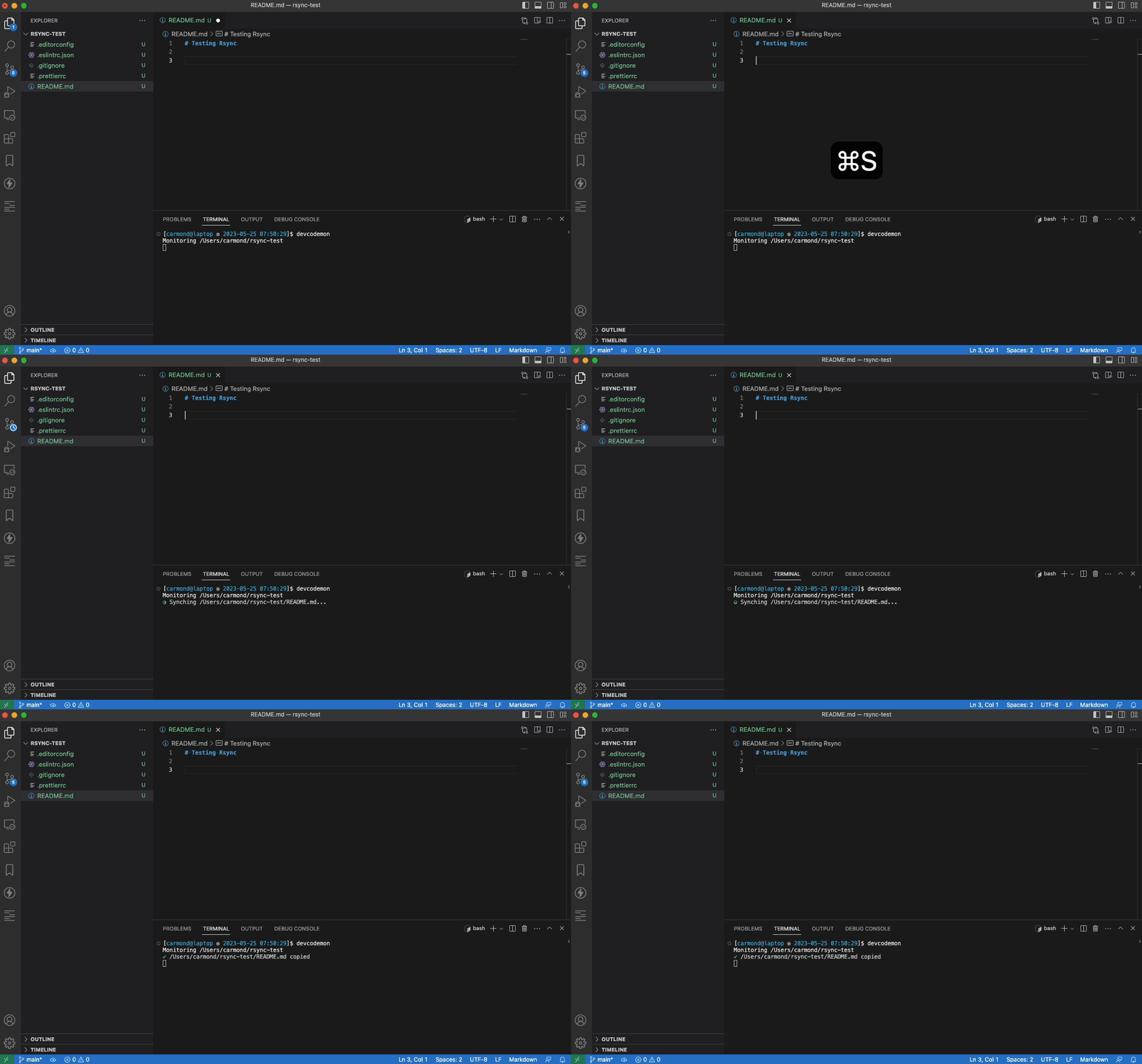
And here is what that looks like in action.

Saving a file

Deleting a file

Thursday, February 2, 2023

The Magic Fridge Part 2

In my first post about The Magic Fridge, I talked about how I could use a Raspberry Pi to turn my garage fridge into a smart appliance. The first thing I did was set up a door alarm for when the door was open for too long. The reason I wanted this feature is because on this particular fridge if you slam the door shut, it will pop back open. So on many occassions I would walk into the garage to find the door open to the fridge.

The first thing I did was purchase a magnetic reed switch from Amazon. Here is an image of what that looks like:
If you are not very familiar with electronics, a magnetic reed switch is a simple switch for controlling the flow of electricity through the use of a magnet. You can get a good explanation here. To use this with my fridge, I attached one side to the side of the fridge and one side to the door. When the door is closed, the magnet closes the switch and thus completes the circuit. When the door is open, the magnet pulls away and opens the circuit which then prevents the circuit from being completed.
I then also wired up an LED bulb to the Pi to turn on when the door is opened. Here is a diagram that gives an overview of everything we have thus far.
Notice that in both circuits I added a small resistor. This is to minimize the current flow and protect the Raspberry Pi from damage. Now that we have our hardware configured, let's take a look at the code.

Step 1 is just to import the Python package that I'll be using:
from config import config
from gpiozero import LED, Button
from message import sendTextMessage
from time import sleep
Next I am going to set up a few things: I will use the max_count variable to be my threshold. So in this case, if the door is open more than 60 seconds, I will take action. Button and LED come from the gpiozero interface (which greatly simplies working with components on the Raspberry Pi in Python). This is just telling my code which pins my button or switch in this case and LED bulb are connected to respectively. The testing and verbose variables will just be debugging purposes.
max_count = 60
testing = False
verbose = False

switch = Button(17)
light = LED(26)
Next I set up a couple of functions to tell it what to do when the switch is open or closed. If I am debugging, it will print a message to the console and then either turn the LED bulb on or off as in each case appropriate.
def switch_open():
    if testing or verbose:
        print("Switch open")
    light.on()

def switch_closed():
    if testing or verbose:
        print("Switch closed")
    light.off()
Next, I set up the event handlers when_released and when_pressed to tell it what to do when the switch is opened or closed.
switch.when_released = switch_open
switch.when_pressed = switch_closed
And then comes the main code block. It is going to initialize my counter to 0, then perform an infinite loop. Each iteration of the loop will check to see if the switch is "pressed" or closed. If that's the case, we reset our counter and do nothing. But if the switch is open, we start counting. When our count reaches our threshold, we will start blinking the light: on for .2 seconds and then off for .2 seconds. And then it will send me a text message to let me know that the door is open so that I can go close it.
count = 0
while True:
    if switch.is_pressed:
        count = 0
    else:
        count = count + 1
        if verbose:
            print("Switch has been opened for %s seconds" % count)
    if (count == max_count):
        light.off()
        light.blink(.2, .2)
        message = 'Fridge door has been open for ' + str(max_count) + ' seconds'
        if verbose:
            print ('Send message to ' + config["alertPhoneNumber"] + ': ' + message)
        if not testing:
            sendTextMessage(config["alertPhoneNumber"], message)
    sleep(1)
Here is the content of my message package that I used for sending myself text message:
import os;
import requests;

def sendTextMessage(phone, message):
    apiKey = '*my-api-key*'
    resp = requests.post('https://textbelt.com/text', {
        'phone': phone,
        'message': message,
        'key': apiKey
    })
    json = resp.json()
    remaining = int(json["quotaRemaining"])
    if (remaining < 5):
        message = 'Less than 5 text messages left. Go to https://textbelt.com/purchase/ to purchase more.\n\nAPI key: ' + apiKey
        os.system('echo "' + message + '" | mail -s "*my-email-address*')
    return resp.json()
Finally, to kick off the script running, I added it to my crontab so that it will automatically run at startup.
@reboot /home/pi/python/fridge/door-check.py
One final note: In my message package above, I have it email me if my quota is getting low and I need to purchse more message on my SMS gateway. Unfortunately as of May of last year Google no longer supports this. So if you have a way of sending emails from your Rasperry Pi, please let me know.

The Magic Fridge

This is the first in what is hopefully going to be a series about The Magic Fridge. What is The Magic Fridge, you say? Well, I have a beverage fridge that I keep in the garage. I am always trying to find unique sodas and drinks to stock it with. My wife made a comment one day about how she never saw me stocking it yet it always seemed to have something new. She said "it's like some sort of magic fridge." The name stuck and now everyone affectionately refers to it as the magic fridge.

One day I got an idea to make it a bit more magical. I thought, what if I could use a Raspberry Pi to turn my ordinary beverage fridge into a smart fridge. Sure, I could probably just go buy a smart fridge (if I had the space and the money) but I have an engineering mindset and enjoyed the technical challenge of making it happen.

There are 3 main features that I implemented with on the Magic Fridge: My hope is to also write an app to track my inventory. I've done some preliminary work on that but as things go with side projects, it has been stagnant for a while.

Tuesday, June 16, 2020

isNaN is not the same as Number.isNaN

Since JavaScript is an untyped programming language, a variable can contain data of any type at any time. But sometimes you need to know what type the data is. Something I have done in the past, is use the isNaN function for this.

Take this (bad?) example. If the variable myData is a number, then we want to format it to 2 decimal places. Otherwise, we just want to display it as is. One way to do that would be:

if (isNaN(myData)) {
   displayString(myData);
else {
   displayDecimalNumber(myData);
}
But then along comes the linter complaining about isNaN:

So I blindly accept its suggestion and change it to Number.isNaN. But now there's a problem because now it's trying to format my string data as a number. What happened?

The problem is that the global isNaN does not behave the same way as Number.isNaN.

The global isNaN function converts the value to a Number, then tests it.

Number.isNaN does not convert the value and will return true for any value that is not of type Number.

So maybe a better way to write this code would be:

if (typeof myData === 'number') {
   displayDecimalNumber(myData);
} else {
   displayString(myData);
}


Wednesday, April 22, 2020

Implicit Argument to JavaScript Promise

I came across some code at work that I did not understand. After doing a little digging, I learned something I did not know about Promises. If you have a single argument to a function, you can use an implicit argument. What does the mean? Let's start with an example:
test(0)
 .then((results) => test(results))
 .then((results) => test(results))
 .then((results) => { console.log(`Results from first test: ${results}`) });

function test(arg) {
 return new Promise((resolve, reject) => {
  resolve(arg + 1);
 });
}
So what's happening here? I am passing the number zero to the function test. It is taking that number, adding one to it, and returning a new Promise. .then((results) => test(results) then takes that result and passes it to the test function again which again adds one and returns a new Promise. Finally, we are printing the result which is 3. Now here is a different way to write that code with an implicit argument:
test(0)
 .then(test)
 .then(test)
 .then(results => { console.log(`Results from second test: ${results}`) });

function test(arg) {
 return new Promise((resolve, reject) => {
  resolve(arg + 1);
 });
}

The result is the same. In this case, .then(test) is the equivalent of .then((results) => test(results)). This shorthand notation only works for a single argument. If you have multiple arguments to your function, you will have to write out the full code.

Tuesday, April 7, 2020

MySQL Subqueries

For most of my software development career, I used an Oracle database. At my current job, we use a MySQL database. So I am still learning the ins and outs of MySQL. Here is a common thing I would do in Oracle:
SELECT
  name, total_points
FROM (
  SELECT
    name,
    SUM(points) AS total_points
  FROM
    scores
  GROUP BY
    name
)
WHERE
  total_points >  10
ORDER BY
  total_points DESC, name
That would give me a list of all players who have scored more than 10 points. When I tried this same format in MySQL, I got this error:
Error Code: 1248. Every derived table must have its own alias
After a little searching, I came up with the solution. I had to name my inner query. So with a slight modification it worked:
SELECT
  tp.name, tp.total_points
FROM (
  SELECT
    name,
    SUM(points) AS total_points
  FROM
    scores
  GROUP BY
    name
) tp
WHERE
  total_points >  10
ORDER BY
  total_points DESC, name


Monday, April 6, 2020

Accessibility and Social Media Management

There is a local radio program that I used to listen to that gives advice on yards and gardening. The host is very knowledgeable and is my go-to resource when I have questions about planting, fertilizing, and weeding. Here was an exchange this morning between (presumably) the social media manager for his account and one of his followers regarding a video that was posted:


The follower asked a simple question but got back a seemingly harsh response. First, let's look at why the follower may have misunderstood the audio.
  • · Maybe the follower is hard of hearing
  • · Maybe the follower's native language in not English
  • · Maybe the follower was in a noisy environment
  • · Maybe all of the above are true
The response from the author did not take any of these things into account. That is why accessibility is important not just for us web developers but for content providers as well. A better response might have been:

Thank you for your question. He was saying "rose soil". Here is an example of a product that we recommend.

Here is another thing to consider. Various sites such as this one report that 85% of Facebook videos are watched without sound! Additionally the World Health Organization reports that globally over 400 million people suffering from some sort of hearing loss. So if you are relying solely on audio on your site to get your message across, you are alienating a large group of people. This is why it is so important to provide captioning on your social media videos.

I realize that not everyone will have the skills, times, and/or technology to caption their videos. So in that case, a good fallback plan when someone poses a questions about the audio is to just be kind.

Tuesday, February 18, 2020

Git Status on Command Line Does Not Match Git Status in VSCode.

A couple of times recently I ran into a situation where VSCode was showing a lot of untracked files in git but the command line was not. Today when I opened up VSCode, it showed over 60 untracked items while the command line only showed 15. It turned out to be a simple misunderstanding on my part.

To demonstrate, I created a new git project with a new subdirectory called new-dir. Inside of new-dir, I created 3 files.

When I run git status on the command line without any parameters, it collapses new directories into single entries.

Command line example

By examining the git output in VSCode, I see now that it is running the command git status -z -u. The -z just terminates each entry in the list with a NUL instead of LF presumably for better parsing. The -u lists out each untracked file individually. And this makes sense because in the source control window of VSCode, you want to be able to see the diff of each file individually.

View of source control panel in VSCode

Wednesday, January 29, 2020

What I Learned from the Job I Didn't Get

Recently I had the unique experience of talking face-to-face with the person who beat me out for the job we both interviewed for. I want to share what I learned from this situation but first let's back up to the beginning of the story.

In 2001 I accepted a job working as NASA's Johnson Space Center as a software developer. I was equally parts shocked and excited when they offered me the job. Over the next 15 years I would have a great career working there. In May of 2016 when our contract was renewed, the government changed some things up from the previous contracts I had been on. Long story short, I ended up with a significant pay cut. It had already been 3 years since my last pay raise due to budget cuts. And with Congress at an impasse more and more, government shutdowns were becoming a regular threat. So for those reasons and others, I decided to start looking for a new job.

In July of that year, I got a call from a recruiter that had found my resume online. He told me about a frontend developer job just down the road from NASA. He got me an interview and I felt pretty good about it. Afterwards he told me that I was their first choice based on my resume and experience. However, after a few weeks went by and I heard nothing, I contacted the recruiter to get a status. He told me that they had decided to go with someone else. I was shocked, although in retrospect I shouldn't have been. I had done a terrible job of selling myself.

I also had a revelation after that: I had not dedicated enough time to professional development. In a perfect world, an employer will make professional development a priority for their employees. But we don't live in a perfect world and so the onus was on me to keep up. And I had not. Over the next couple of years I would take to Twitter, newsletters, and online training to educate myself on the latest and greatest tech in frontend development. I landed interviews with several companies during that time (sometimes even multiple interviews) but couldn't seem to get an offer. I finally decided to take a break from the job search.

About the time I made the decision to quit looking, I got a call from that company I had first interviewed with in 2016. They wanted to know if I'd be interested in interviewing for a developer job. I interviewed with some of the same people I had interviewed with before. And this time, I got an offer. I accepted the job and with much sadness, I left NASA after 17 years.

One day I realized that my coworker DJ (not his real name) was the person who had beat me out for the frontend developer position two years earlier. So I asked him about it. He told me that when he had interviewed for the job, he built a small prototype to demonstrate his skills. I really think this extra initiative on his part was what won him the job.

Lessons Learned

Professional Development

The world of web development is changing very rapidly. I had let my success at NASA stagnate me. I did look at new technologies from time to time, but I wasn't making a concerted effort to study and learn. That was a mistake. Take a little time every day out of our schedule for professional development.

Interviewing

Don't expect your resume to do all of the talking for you. I have a really hard time talking about myself. I don't like to draw attention to myself. But when you are interviewing, you have to do this. Build an online portfolio to show your work. Do something to make yourself stand out. For one job I applied for, I incorporated the company's colors and logo into my resume. The interviewer mentioned that it caught his eye.

It Will Take Some Time

When I first started interviewing, I thought it would take a few weeks maybe a couple of months at most to get an offer. I had no idea it would take two years! Be patient. Don't get your hopes up too high. Sometimes an interview will go great and you'll still get passed over for the job. That's ok. That job might have sounded great but maybe it wasn't so great. Maybe the people were difficult to work with. Maybe the management was unreasonable. Maybe the company is about to go under. Just assume that if you didn't get the job, it was for good reason.


Oh and for the record, I think hiring DJ over me was definitely the right decision. :)

Wednesday, December 4, 2019

Destructuring and Spreading in JavaScript

I wanted to get a better understanding of destructuring and spreading for a project I am working on. So I created this jsfiddle to understand it better.

What I really wanted to know was would happen if I tried to unpack a value from an object that did not exist. And then what would subsequently happen if I tried to use that value in a spread operation. For example:
const testObj = {
    a: [1, 2, 3],
    b: [4, 5, 6]
}

const { a } = testObj;
const { b } = testObj;
const { c } = testObj;

const combined = [...a, ...b, ...c];

The short answer is this: if you try to destructure a non-existent property, then you get an undefined value. And if you try to use that undefined value in a spread operation, JavaScript will throw an error: TypeError: undefined is not iterable (cannot read property Symbol(Symbol.iterator))

Sunday, September 15, 2019

PHP: Failed opening required filepath in Unknown on line 0

I ran into this error message while working on a personal project. I had set up the code in my Microsoft OneDrive folder to sync it between my laptop and my desktop. I suspected the error might have something to do with OneDrive, so I copied my code to another folder on my computer. Sure enough, it worked perfectly. Finally, I discovered the problem. It was a setting in OneDrive called "Files On-Demand". What I suspect is that the files were simply just 0-byte stubs on my desktop. So when PHP requested them, it failed. Once I unchecked this box and OneDrive downloaded all of the necessary files, it worked just fine.

Monday, April 29, 2019

Make Your Console Statements Stand Out

Using the Chrome DevTools to debug your JavaScript code is great. Breakpoints are a great way to analyze what is going on with your code. But sometimes you just need an old-fashioned console.log. But if you have an app that is already chatty in development mode with a lot of console messages, there is a way to make your console statement stand out. You may not know that you can format your console statements with CSS. For example:
console.log('%cExample', 'background: #a00; color: #fff; font-weight: bold; font-size: 110%');
will look like this in your console:

Example

A better way to do it, though, is to use a JavaScript template literal. For example:
let xyz = 123;
console.log('%c%s', 'background: #a00; color: #fff; font-weight: bold; font-size: 110%', 
  `The value of xyz is ${xyz}`);
Will produce:

The value of xyz is 123

Now to make it even easier, we can create a VS Code snippet:
"color-console": {
 "prefix": "color-console",
 "body": [
  "console.log('%c%s', 'background: #a00; color: #fff; font-weight: bold; font-size: 110%', `$1`);"
 ],
 "description": "Color coded console message"
},
And then voilĂ 

Tuesday, April 23, 2019

Sequelize Newbie Mistake

Today I inherited a piece of code that looked something like this:
const records = Records.findOne({
    where: {
        pk: 'blah',
    },
    sort: ['dateField', 'DESC']
});
It did not seem to be sorting correctly, so I looked up ordering for Sequelize. Since I am new to Sequelize, I did not know that the correct property is order and not sort. But when I changed it, I got this error message:
Unknown column \'DESC\' in \'order clause\'
It took me longer than I care to admit to see what the issue was. If you pass an array of single items to the order property, it will use them all as part of the sort. So the backend SQL query looked something like this:
SELECT * FROM my_table WHERE pk = 'blah' ORDER BY dateField, DESC
What I really wanted was to pass it an array of arrays to sort on. So the correct code looks like this:
const records = Records.findOne({
    where: {
        pk: myValue,
    },
    order: [
        ['dateField', 'DESC']
    ],
});
Notice that order property now is an array containing an array specifying the field to sort on and the direction with which to sort it.

Thursday, March 21, 2019

Case-insensitive matching with case-sensitive replacements in JavaScript

That title is a mouth full. Here is what I was trying to accomplish: I had a search term that I wanted to highlight in a body of text. So my code needed to match all occurrences of the search term and then enclose the matched text within some HTML in order to format it. Seems simple enough, but I ran into a couple of issues.

Let's say I am going to format a phone number from a string of digits. I would do it like this:
let phone = '5551234567';
phone = phone.replace(/(\d{3})(\d{3})(\d{4})/, '$1-$2-$3');
But that syntax doesn't work for me here because I need to pass the search pattern as a variable name and I need to specify the "i" and "g" flags. So this code will not work:
const searchTerm = 'xyz';
myText = myText.replace(/searchTerm/ig, 'THE'); // Not valid
First, I use the RegExp constructor to define my pattern.
const searchTerm = 'xyz';
const pattern = RegExp(searchTerm, 'ig');
let myText = 'xyz XYZ xYz';
myText = myText.replace(pattern, 
  `<span class='highlight'>${searchTerm}</span>); 
  // Results will all be lowercase because searchTerm is lowercase
Then I had to create an array of matches that I could then loop through and replace each one individually:
let sampleText = 'This is my sample text: test Test TEST';
const searchText = 'test';
const pattern = new RegExp(searchText, 'ig');
const matches = sampleText.match(pattern, sampleText);
if (matches !== null) {
 matches.forEach((match) => {
  sampleText = sampleText.replace(match, `${match}`);
 });
}
To see this in action, take a look at this JSFiddle.

Thursday, January 31, 2019

Using Workspaces

I'm a big fan of Visual Studio Code's workspaces. In the past, I've used them to separate my work into different projects and applications or different parts of an application (like server-side vs client-side). At the moment we are wrapping up a release at my job so I am often jumping between various tickets. It occurred to me this morning that I could create a new workspace for each ticket. The reason this is helpful is because sometimes I may need these 4 files open for one ticket and a different 5 files open for a different ticket. So instead of keeping them all open and jumping around, I can have just the files I need open for that particular ticket to avoid confusion.

So then the thought occurred to me, what if I could do the same with Chrome? Fortunately, there is an extension for that. Now I can open my application and all my reference material in one workspace and a different set of tabs in another workspace.

Simple. Efficient. I like that.

Tuesday, January 8, 2019

Find This Not That in jQuery

Today at work, I came across a jQuery find statement that was selecting a bunch of different elements but I needed to excluded a single class from the selection. Of course, I hit Google and Stack Overflow for an answer but nothing was quite exactly what I needed. I found the solution and also learned something else about jQuery in the process. So here is what I came up with.

The solution was to chain a filter call to the find statement using the not selector.

Here is a contrived example on CodePen. In this example, I am selecting all buttons except for the btn-danger and btn-warning classes:
var myButtons = $('#main')
     .find('button')
     .filter(':not(".btn-danger,.btn-warning")');

Something I noticed in the console is that there is an object created called prevObject. This object contains the matched elements before the filter is applied which could be useful.

Thursday, June 7, 2018

Using the VS Code Integrated Terminal with Remote Hosts

I am in the process of writing some server-side scripts on a remote server. There are three things that would make it easier:

1. If I could write the code directly to the server from VS Code
2. If the integrated terminal in VS Code would automatically log me into that server
3. If I could easily toggle between the code window and the terminal window

I am going to describe how to do all of those things.

Writing Code Directly to the Server in VS Code

To write code directly to the server, I am using an SFTP extension I found in the VS Code Marketplace. The extension I am using is simply called sftp.

To configure it, you open the command palette (Cmd+Shift+P) and select SFTP: Config. This will generate a file called sftp.json within the .vscode directory of your workspace. You can check out the full config options, but basically you just need to specify the host, username, and remote path. So that my code is automatically saved to the server, I set the uploadOnSave option to true in the sftp.json file.

And so that I don't have to log in every time, I am using the privateKeyPath option as well. I won't go into the details here of how to set up SSH for auto login without a password but it is definitely a time saver.


Automatically Logging into the Remote Server

The next thing I wanted to accomplish was automatically logging into the remote server in the integrated terminal. To do that I need to update my workspace settings.

To start I select Code ▶ Preferences ▶ Settings to open the Workspace Settings. Then within the settings, I add some JSON to tell it to call the ssh command with an argument of the server name.


Also, because I like to color code my terminal windows, I found the workbench.colorCustomizations setting which allows me to set a value for terminal.background.

For this change to take effect, I have to restart VS Code. A security feature prompts me to make sure this is what I really want to do. This only happens the first time.


I have to restart VS Code one more time. This time when I open the terminal, it automatically logs me into the remote server so that I can test my scripts.

Toggling Between the Code Window and the Terminal Window

While I like having the terminal window integrated into my IDE, I don't like having to use the mouse to click back and forth between the two windows. Fortunately, someone on Stack Overflow had already solved that problem.

This time I go to Code ▶ Preferences ▶ Keyboard Shortcuts. To make the change, I first have to click on the keybindings.json link:


Then I can paste in the code for my settings.


Now after I save my code, I simply press Ctrl+` to switch to the terminal window, test my code, and then press Ctrl+` again to return back to my code.

 
Blogger Templates